Match by SKU, barcode, title or metafield
Exact, “image contains identifier” or “identifier contains image name”: 14 rule-based matching types, so the naming you already use just works.
Drop your photos in a Google Drive or Dropbox folder. The app matches every file to the right product and variant by SKU, barcode, title or metafield, shows you a full preview, then uploads them all with SEO alt text.
Free plan · 25 images · no credit card
Launching a catalog, migrating from another platform or refreshing photography means thousands of images to attach by hand. Smart Bulk Image Upload turns hours of clicking into a single, predictable run.
How it works
Nothing is written to your store until you press Start upload.
Use Google Drive or Dropbox. Name each file after an identifier your catalog already has, like AB-1234.jpg, AB-1234_1.jpg, AB-1234_2.jpg for three images in order.
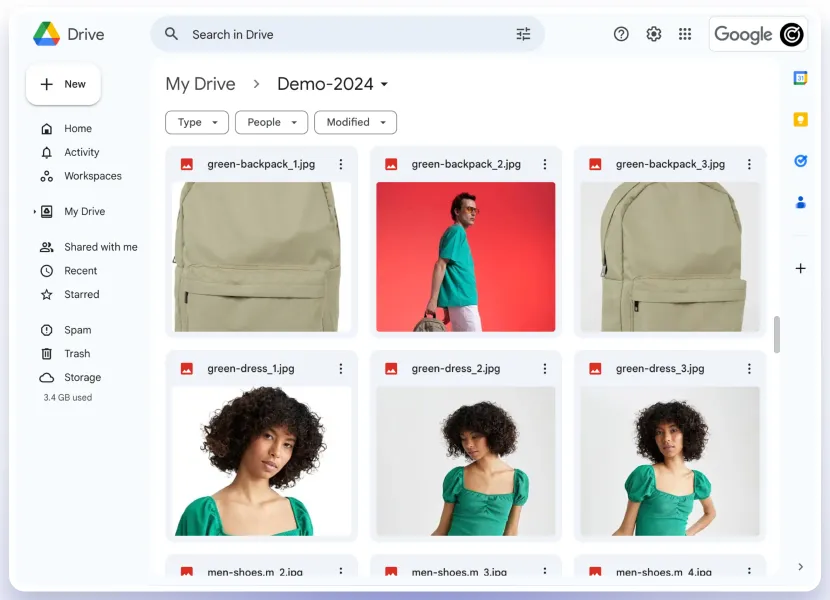
Connect your account with one click and choose the folder. The app counts the images it finds. Your files are never moved, renamed or deleted.
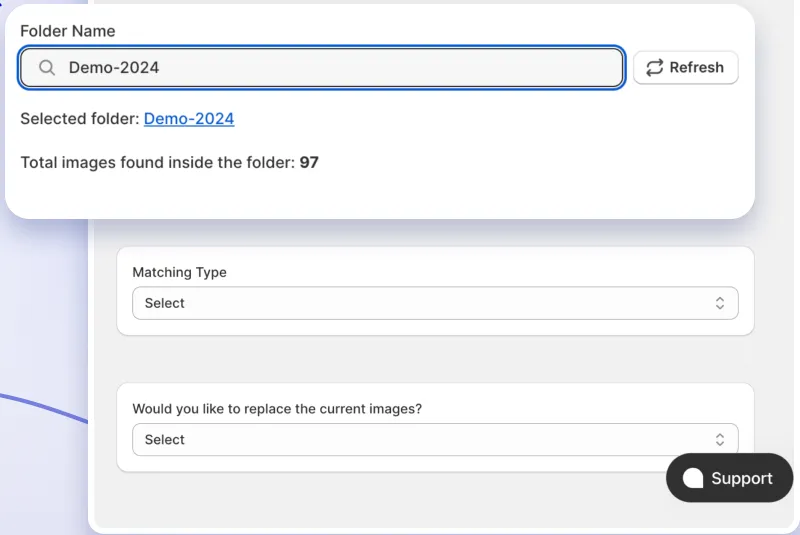
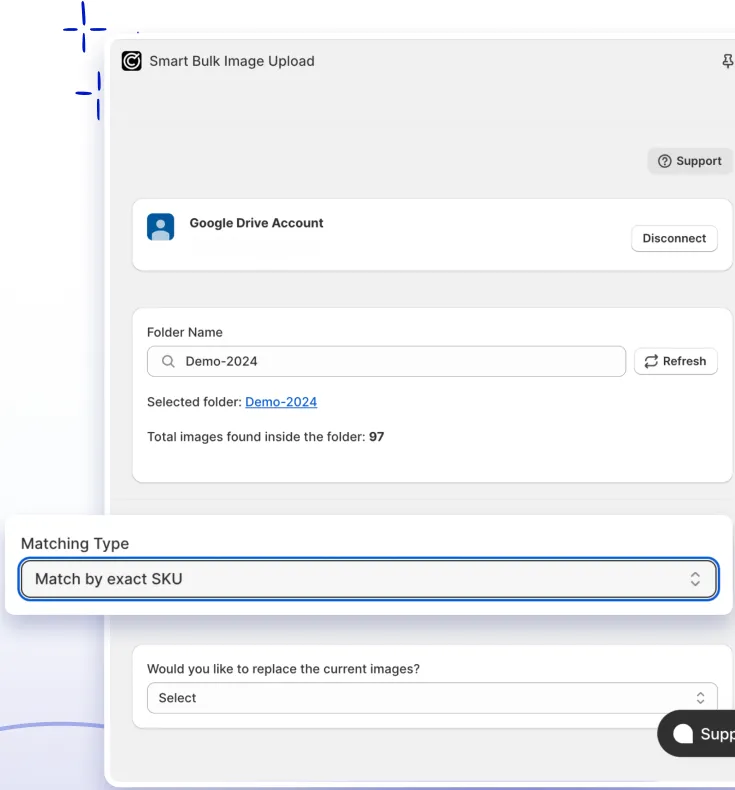
Match by SKU, barcode, product title, metafield or variant ID: exactly, or when one contains the other. Or let AI read messy file names the way a person would.
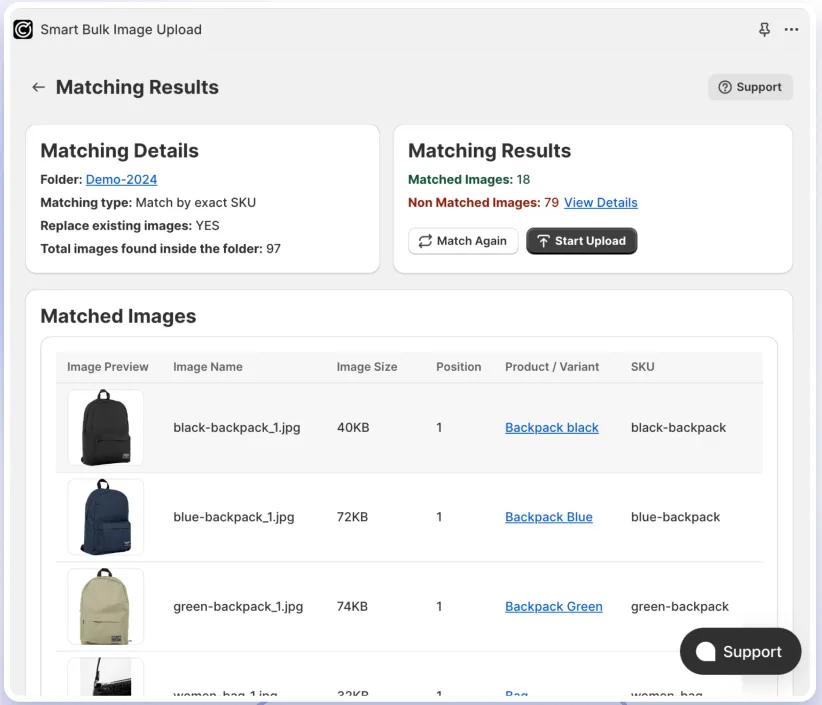
See every image next to the variant it will attach to, its position and its alt text. Fix anything, press Start upload, and follow a live log. You get an email when it is done.
Features
Exact, “image contains identifier” or “identifier contains image name”: 14 rule-based matching types, so the naming you already use just works.
Different separators, extra words, colour names or image numbers? AI matching (beta) reads each name like a person would. You still review every match.
Matching is read-only. Unmatch, match manually, edit a variant or export unmatched files as CSV. Then upload.
Add _1, _2, _3 to set the gallery order. The first image of each variant becomes the variant image automatically.
Alt text is generated from the product and variant title, and you see the exact value before upload.
Images over Shopify’s 20 MB or 20 megapixel limits are resized and re-encoded instead of failing.
Keep existing images and add new ones, or replace a product’s gallery, optionally keeping the old files in Content → Files.
Tens of thousands of images per run. Jobs run in the background, ride out Shopify rate limits and resume after a restart.
A per-image log with a link to every variant, a clear reason for any failure, and the same log in your inbox.
Sub-folders, collection filters, identifier clean-up rules, custom alt text formats: our team switches them on for your store.
File naming
Use the identifier, optionally followed by an underscore and a number for the image order. Upper and lower case don’t matter.
<identifier>_<order>.<extension>
| File name | Matches | Position |
|---|---|---|
| AB-1234.jpg | ab-1234 | 1st |
| AB-1234_1.jpg | ab-1234 | 2nd |
| AB-1234_2.png | ab-1234 | 3rd |
| 7891234567890.jpg | 7891234567890 (barcode) | 1st |
Connect Google Drive or Dropbox with read-only access. Your images stay where they are.
 Google Drive
 Dropbox
Reviews
Rated 5.0 out of 5 from 110 reviews on the Shopify App Store.
“We've migrated 60k+ SKUs into Shopify and this app has saved us so much work, couldn't have managed without it.”“Excellent app that has saved us countless hours managing product images. The bulk upload process is fast, reliable, and easy to use. It has significantly streamlined our Shopify workflow and made large image updates effortless. Highly recommended.”“12k+ images to upload and navigating Shopify's complex csv structure to match a 40k sku catalogue was made possible thanks to the approachable interface and key input from the team on the chat tool.”“Smart Bulk Image Upload worked perfectly for us. We successfully matched and uploaded over 7,000 images, saving an enormous amount of time and manual effort, as we prepare for going live with our store.”“Really Powerful app. Very easy to use, I bulk uploaded 9,000 images with only a few issues caused by a few outlier SKU numbering formats. I used the in app chat to talk with the developer and they helped me get those last few issues sorted out within 10mins.”“I rarely leave a review but this app is truly amazing! Even with this price it's worth every penny as it saves our team hundreds of hours of work. The interface is easy to use. No bugs.”“10/10 service! The team were so helpful and got us set up with customisations to order the images as they upload. With 4 websites this saved us SO much time and many headaches.”“Great app when dealing with large amounts of data and images. Contacted support for help on matching metafields and they made the change overnight. Great customer experience and support.”“Handige app die doet wat hij moet doen en veel tijd bespaart. De functionaliteit is sterk en zodra je de werking goed begrijpt, loopt het proces soepel. Zeker een aanrader voor bulk image uploads in Shopify.”At a glance
Smart Bulk Image Upload is a Shopify app by Craftshift that bulk-uploads product images from Google Drive or Dropbox and attaches each image to the right product and variant by matching the file name to a SKU, barcode, product title, metafield or variant ID.
Pricing
Matching and previews are always free and unlimited, so you can test your whole catalog before you pay.
Try it on your real catalog
Free
Start freeFor Shopify Basic, Grow and lower plans
$69/ month
Choose planFor Shopify Advanced plans
$99/ month
Choose planFor Shopify Plus plans
$149/ month
Choose planAll prices in USD, billed every 30 days on your Shopify invoice.
Smart Bulk Image Upload is a Shopify app that bulk-uploads product images from a Google Drive or Dropbox folder and attaches each image to the right product and variant automatically.
Instead of dragging images into products one by one, you name your files after an identifier your catalog already has (a SKU, a barcode, a product title, a metafield value or a variant ID), pick the folder, and the app does the rest. It also writes SEO alt text on every image.
The app reads each image's file name and compares it with an identifier on your variants: SKU, barcode, product title, metafield value or variant ID, whichever you choose. Matching is case-insensitive.
So AB-1234.jpg lands on the variant whose SKU is AB-1234. The standard matching types are rule-based, so results are predictable and repeatable. If your file names are inconsistent, the optional AI matching (beta) reads them the way a person would, and you still review every match before anything is uploaded.
Yes, both. You pick one source per store in Settings and can switch at any time. Two differences are worth knowing:
By default only the selected folder is read. Sub-folder scanning can be switched on for your store on request.
Name each file after the identifier, optionally followed by an underscore and a number for the image order: <identifier>_<order>.<extension>.
| File name | Matches | Position |
|---|---|---|
AB-1234.jpg |
ab-1234 | 1st |
AB-1234_1.jpg |
ab-1234 | 2nd |
AB-1234_2.png |
ab-1234 | 3rd |
7891234567890.jpg |
7891234567890 | 1st |
If the part after the last underscore is a number, it is the image's position; otherwise it stays part of the identifier. Upper and lower case don't matter. See the naming guide for every rule.
The usual causes, in order of likelihood, are duplicate identifiers, empty identifiers, naming slips and stale data:
Every unmatched image is listed in the preview with the identifier the app looked for, and you can export the list as CSV.
Yes. Matching is completely read-only: the app shows a preview of every pairing (thumbnail, file name, position, the variant it will attach to, the identifier it matched on and the exact alt text) plus a list of every image that matched nothing.
Nothing is written to your store until you press Start upload, so you can run matching as often as you like while you perfect your naming.
Tens of thousands of images per run. Large catalogs are what the app was built for: it loads your full catalog in one bulk operation, downloads and uploads in parallel, and resumes after a restart. Merchants have used it to migrate catalogs of 40,000–60,000 SKUs.
Shopify limits how fast files can change in a store, so a very large batch runs steadily over hours rather than minutes. The app backs off and retries automatically, so you don't need to watch it.
Install in under a minute, connect your folder and see your full matching preview before you spend anything.